What to Check Before You Travel: A Step-by-Step Trip Safety Check
What to check before a trip: State Department advisory, CDC health notices, entry rules, emergency numbers, and active hazards at your destination.
What this walkthrough covers
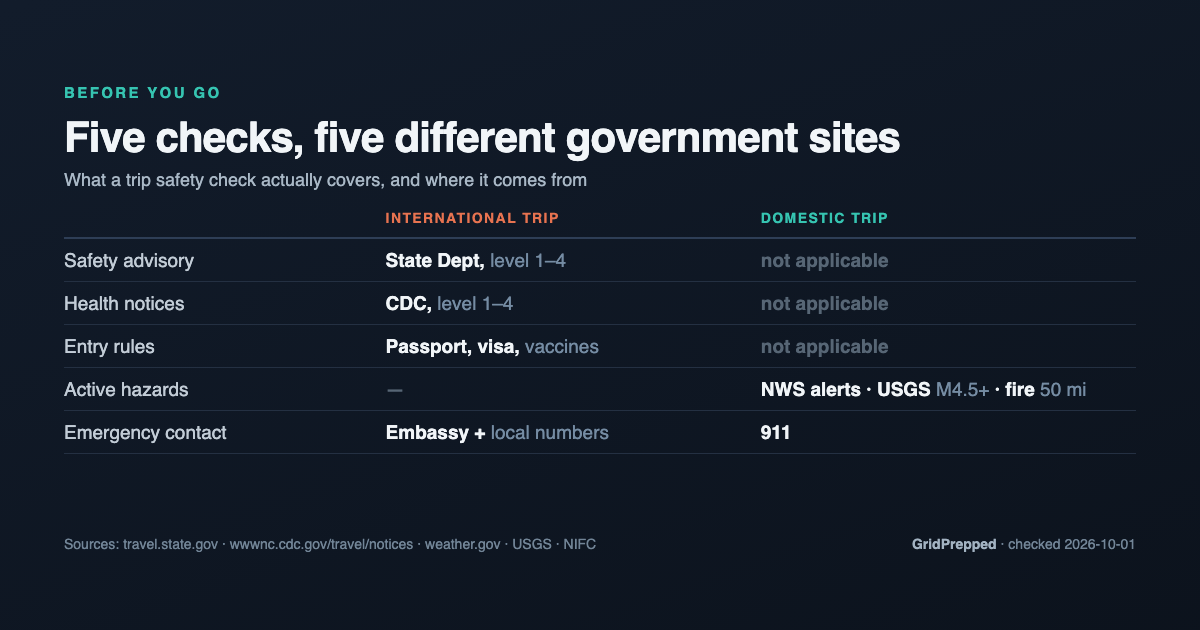
Before any trip there are five things worth looking up: the government's current advisory for where you are going, any health notices for that destination, the entry rules, the local emergency number, and whatever weather or hazard is active at the place itself. All five are published free by U.S. agencies, and they live on five different sites.
GridPrepped's travel page pulls them into one lookup. Here is how to use it, step by step, for an international trip and for a domestic one.
Step 1: Sign in and open the travel page
The travel tools sit behind a free account, because they save your trips and keep checking them after you close the tab. Sign in, then go to gridprepped.com/dashboard/travel.
You will see three tabs: Quick Check, Plan Trip, and Monitoring. The Monitoring tab shows a count badge when you have trips still running.
Step 2: Quick Check, when you just want the advisory
Use this tab when you are still deciding where to go and do not want to save anything yet.
In the Check an advisory card, type a city into the City field. It takes plain city names, so "Paris", "Bangkok" or "Mexico City" all work. As you type, the page resolves that city to a country and shows it below the field. If it comes back with no match, add the country name and try again.
Press Check. You get the State Department advisory for that country, the current CDC health notices, and, for the most-visited destinations, the entry requirements, embassy and local emergency numbers.
That is the whole tab. One field, one button, no saving.
Step 3: Plan Trip, international
Open the Plan Trip tab, then pick the International sub-tab. The card is titled Plan an international trip, and it saves your destinations and re-checks State Department advisories daily until your end date.
Fill in:
- Trip name. Anything you will recognise later. The placeholder suggests something like "Q2 EMEA customer visits".
- Start date and End date. The end date is what stops the monitoring, so set it to when you actually get home rather than when the conference finishes.
- Destinations. Type a city name and add it. Add one per stop, so a London-then-Kyiv trip gets both.
- Travelers. A name or a role for each person. Useful when someone else needs to know who was on the trip.
- Notes. Anything you want attached to the trip.
Then press Save trip & check advisories. The advisories come back immediately, and the trip stays saved.
One thing on that screen worth not skipping: the Enroll in STEP button. STEP is the State Department's free Smart Traveler Enrollment Program, which registers your trip with the nearest embassy. GridPrepped links you to it and does not submit anything on your behalf, so it only counts if you actually go and enrol.
Step 4: Plan Trip, domestic
Same tab, Domestic (US) sub-tab. The card is titled Plan a domestic trip.
- Trip name. The placeholder here is "Thanksgiving with family", which is about right for what this is for.
- Traveling by. Choose Car or Plane. Choosing Car matters: it also watches along your driving route, not only at the two ends.
- Leaving from and going to. Each location can be entered three ways, and there is a toggle to pick which: a ZIP like 83702, a city like "Boise, ID", or a full address like "1600 Pennsylvania Ave NW, Washington DC". ZIP is the fastest if you know it.
- Dates. A departure day, then arrival and departure dates for the destination.
- Round trip. Leave the switch on and it adds the leg home, with its own date.
Press Save trip & start monitoring.
For each location on that trip, GridPrepped then watches three live federal feeds: active National Weather Service alerts above minor severity, USGS earthquakes of magnitude 4.5 or greater within about 80 kilometres, and active wildfire perimeters within 50 miles from the interagency fire dataset. Those three are the ones most likely to change a drive, and none of them appear in a destination weather forecast.
Step 5: The Monitoring tab
This is where saved trips live. Each one can have monitoring switched on or off, and there is a re-check control if you want to look right now rather than wait.
While a trip is active, the check runs on its own once a day and emails you when something new appears. It keeps track of what it has already told you about, so you get the new fire perimeter rather than the same one every morning, and it will not send more than one email per trip within a four-hour window. When the end date passes, it stops.
What comes back, and what to do with it
The advisory level. State Department ratings run 1 through 4: usual precautions, increased caution, reconsider travel, do not travel. Read the stated reasons, not only the number. France is a Level 2 for terrorism and civil unrest. Colombia is a Level 3 for crime, terrorism, civil unrest and kidnapping, with individual departments rated Do Not Travel on their own. A country can be Level 3 overall while the stretch you are visiting is nothing like the part driving the rating.
CDC health notices, on their own 1 to 4 scale:
| Level | What CDC means by it |
|---|---|
| 1 | Practice usual precautions |
| 2 | Practice enhanced precautions |
| 3 | Reconsider nonessential travel |
| 4 | Avoid all travel |
Colombia currently carries a Level 2 notice for yellow fever, alongside standing global notices for dengue and measles. Check this at booking rather than the week before, because a notice telling you to get a vaccine is only useful while there is still time for it to work.
Entry requirements, embassy and emergency numbers, for the most-visited destinations. Look up France and you get the three-month Schengen passport rule, the 90-days-in-180 visa-free allowance, the note that ETIAS pre-authorisation now applies, the U.S. Embassy in Paris at 2 avenue Gabriel with its phone number, and 112, 17, 15 and 18 for general, police, ambulance and fire. Put those numbers in your phone before you fly. Nobody looks them up mid-emergency.
That list does not cover everywhere. Colombia has no entry or embassy record in it today, and in that case the page says so and points you at the State Department country page and the U.S. embassy directory rather than leaving a blank.
One more thing: the place you left
You spent a week researching where you are going. Nobody checked the house you left empty.
GridPrepped's alerts let you watch up to five locations, each with its own setting: off, severe only, or moderate and up. Your own address, a parent's, a kid's campus. Set home to moderate while you are away and leave the rest on severe only, so the trip is not interrupted by a passing thunderstorm. Everything arrives as one digest covering all the places you watch.
The short version
1. Sign in, open the travel page.
2. Quick Check for a one-off advisory lookup.
3. Plan Trip, International, to save a trip and get daily advisory re-checks.
4. Plan Trip, Domestic, to watch weather, earthquakes and wildfires at every stop.
5. Monitoring to switch trips on and off, or re-check now.
6. Set alerts for the address you are leaving behind.
Want to start without an account? Build a plan first. It works without signing in and covers the household side of being away.
None of this makes a trip risk-free, and none of it replaces reading the official pages yourself. It does mean you will have read them.
Sources
U.S. Department of State, Travel Advisories: https://travel.state.gov/content/travel/en/traveladvisories/traveladvisories.html
Smart Traveler Enrollment Program (STEP): https://step.state.gov/
CDC Travelers' Health, Travel Health Notices: https://wwwnc.cdc.gov/travel/notices
U.S. Embassy directory: https://www.usembassy.gov/
National Weather Service active alerts: https://api.weather.gov/alerts/active
USGS Earthquake Catalog: https://earthquake.usgs.gov/earthquakes/search/
National Interagency Fire Center, WFIGS perimeters: https://data-nifc.opendata.arcgis.com/
Advisory levels, health notices, entry details and embassy records above were checked on 2026-10-01 and change over time. Confirm current status on the official pages before you travel.
Build your household's emergency plan
Free, and built around where you live.